PUBG: Playgrounds Explained: Everything Announced So Far
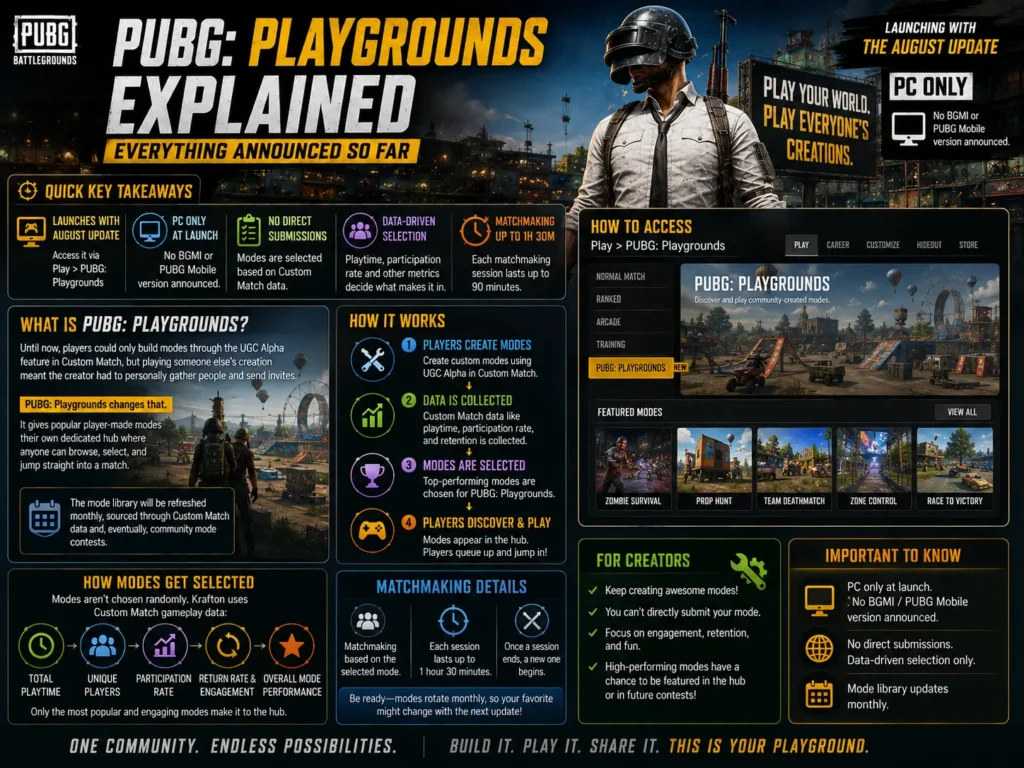
Krafton just confirmed exactly how PUBG: Playgrounds will work, and it changes how community-created modes reach players. Arriving with the August Update, here is every detail from the official announcement, how modes get selected, how matchmaking works, and what creators need to know.
Quick Key Takeaways:
- PUBG: Playgrounds launches with the August Update as a dedicated hub for community-created modes, accessed via Play > PUBG: Playgrounds.
- It is PC only at launch. No BGMI or PUBG Mobile version has been announced.
- Mode creators cannot directly submit their creations, modes are selected based on Custom Match gameplay data like playtime and participation rate.
- Matchmaking sessions last up to 1 hour 30 minutes, and the mode library updates monthly.
What Is PUBG: Playgrounds?
Until now, players could only build modes through the UGC Alpha feature in Custom Match, but playing someone else’s creation meant the creator had to personally gather people and send invites. Browsing what other players had built was just as difficult, which kept most community-created content buried and inaccessible.
PUBG: Playgrounds fixes that by giving popular player-made modes a dedicated page where anyone can browse, select, and jump straight into a match. Krafton says the mode library will be refreshed monthly, sourced through Custom Match data and, eventually, community mode contests.
How Modes Get Added: The Selection Process
There is currently no direct submission option for creators. Instead, Krafton’s selection process runs in three steps:
| Step | What Happens |
| 1. Play in Custom Match | The more a mode is played in Custom Match, the more gameplay data it accumulates. |
| 2. Developer Review | Krafton monitors data such as total playtime and average participation rate to spot popular modes. |
| 3. Addition to Playgrounds | Modes meeting the criteria are added, making them reachable through matchmaking. |
Grounds for exclusion include content that violates the Rules of Conduct or Mods Policy, critical bugs that break normal gameplay, or inappropriate text in the mode. A mode can stay listed if only its description needs editing, for example removing promotional links, personal social handles, or clan information.
What Creators Should Know Before Building
- Custom Match (Create) requires a BATTLEGROUNDS PLUS account.
- If you do not set a custom thumbnail, an in-mode screenshot is used automatically.
- Setting accurate primary and secondary tags directly affects how easily players discover your mode.
- If your mode gets selected, Krafton may adjust settings like score limits or round counts to keep gameplay stable.
Browsing and Playing Modes: Page Overview
The Main Page lists every currently available mode with its name, primary tag, and thumbnail. Hovering the info icon reveals the mode name, creator, tags, and max players/team size. The page is organized into three sections:
- New — recently added modes, shown in random order (only appears once enough modes exist).
- Recently Played — your own play history, most recent first.
- All — every available mode, randomized.
You can also search by mode or creator name and filter by primary tag. Selecting a mode opens its details page, showing the main image, mode type, creator info, round count, max players, perspective, and version/update history, plus the creator’s full description with an AI translation option for reading it in another language.
How Matchmaking Works
Once you pick a mode, matchmaking starts directly from its details page. A session stays active for up to 1 hour and 30 minutes, though Krafton notes this duration may change later. If you switch between a community mode and Normal or Ranked Mode, your party can be automatically disbanded if it exceeds the new mode’s max player count. To host directly rather than matchmake, use Go to Custom Match or Create, which requires BATTLEGROUNDS PLUS and locks the preset, map, and max player count.
Mode Tags Explained
| Primary Tag | Tag-Specific Secondary Tags |
| Battle (Team) | Team, 1v1, 2v2, 3v3, 4v4, NvN |
| Battle (Free-For-All) | — |
| Training | Completion time (Under 5 min / 5-10 min / Over 10 min), Difficulty (Easy / Normal / Hard) |
| Parkour | — |
| Casual | — |
| PvE | — |
Shared secondary tags available across primary tags include Battle Royale, Deathmatch, Conquest, Puzzle, Racing, Party, Defense, Gun Game, and Wave. Every mode requires exactly one primary tag, plus zero to two secondary tags.
What BGMI and Mobile Players Should Know
PUBG: Playgrounds is confirmed for PC only at launch, with the official announcement making no mention of Console or Mobile availability. This lines up with the earlier PUBG x CurseForge UGC Contest, which is also PC/Console-based. Krafton has not announced a BGMI or PUBG Mobile equivalent, but a dedicated, matchmaking-ready hub for community modes is a strong signal of where the franchise’s creator tools are heading long-term.
FAQ: PUBG: Playgrounds
Q: When does PUBG: Playgrounds launch?
A: It arrives with the August Update, accessible through Play > PUBG: Playgrounds.
Q: Can I submit my mode directly to PUBG: Playgrounds?
A: No. There is currently no direct submission option. Modes are selected by Krafton based on Custom Match gameplay data like playtime and participation rate.
Q: Is PUBG: Playgrounds available on console or mobile?
A: The official announcement confirms PC availability only. No console or mobile version has been announced.
Q: Do I need BATTLEGROUNDS PLUS to play modes in Playgrounds?
A: No, matchmaking through Playgrounds is available without agreeing to the Mods Policy. However, using Create or Custom Match to build or host a mode does require a BATTLEGROUNDS PLUS account.
Q: How long does a matchmaking session last?
A: Up to 1 hour and 30 minutes per session, though Krafton says this duration may change in the future.
Final Word
PUBG: Playgrounds turns Custom Match creations from a hidden feature into a real, matchmaking-ready hub, and the monthly refresh cycle means the mode library should keep growing well past launch. Bookmark this page, we will update it as soon as the August Update goes live and the first wave of modes appears.
Would you want to see something like PUBG: Playgrounds come to BGMI? Let us know in the comments, and share this with your squad before the August Update drops.
Rất đáng đọc, cảm ơn tác giả. Công ty Letco cung cấp dịch vụ du học Hàn Quốc trọn gói, tư vấn tận tâm và minh bạch chi phí. Tìm hiểu tại letco.vn.