Best BGMI Sensitivity Codes for 2-Claw, 3-Claw, and 4-Claw Gyroscope Players
A sensitivity code that feels perfect on a 4-claw layout will feel wrong on 2-claw, and vice versa. More fingers on the screen means more points of contact, which changes how much your camera, ADS, and gyro values need to do. Here is exactly how to set each layout, with values you can dial in manually in under 10 minutes.
Quick Key Takeaways:
- Finger count changes ideal sensitivity because each extra claw finger adds a point of screen contact, lowering how much camera sensitivity you need.
- 2-claw needs the highest gyroscope values, 4-claw needs the lowest, since more fingers already provide fine control.
- Sensitivity codes are device and update-version specific, always calibrate in Training Ground rather than trusting a code blindly.
- Camera sensitivity does not fix recoil. Only ADS and Gyroscope values control spray stability.
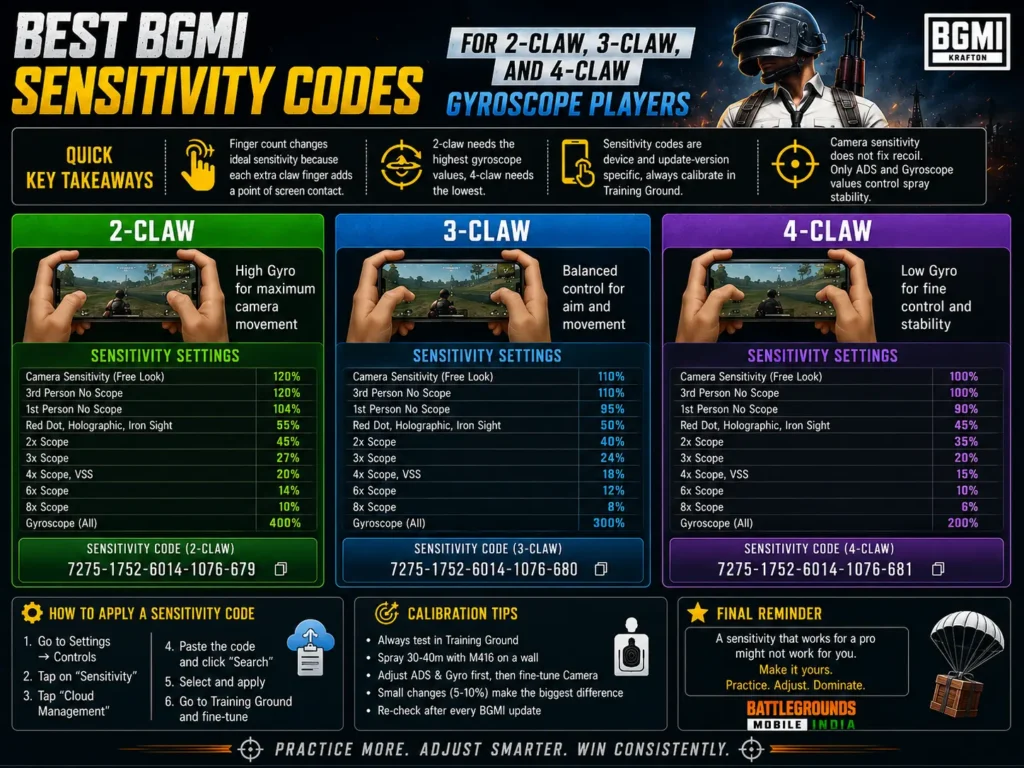
Why Claw Count Changes Your Ideal Sensitivity
A 2-claw player uses two fingers for aim and fire, so each finger movement has to cover more ground, which means higher camera and gyro values. A 4-claw player spreads fire, aim, and movement across four points of contact, so smaller, more precise adjustments are possible, which means lower values produce faster, cleaner tracking.
This is exactly why copying a pro player’s exact code rarely feels right out of the box; the code was tuned for their layout and device, not yours.
2-Claw Gyroscope Sensitivity Settings
Best suited to players who keep two fingers dedicated to fire and aim, with movement handled by thumbs. Needs the highest sensitivity values of the three layouts to compensate for fewer points of contact.
| Setting | Value |
| Camera Sensitivity (No Scope / Red Dot) | 145% |
| ADS Sensitivity (No Scope / Red Dot) | 115% |
| ADS Sensitivity (2x / 3x) | 60-70% |
| ADS Sensitivity (4x / 6x) | 35-45% |
| ADS Sensitivity (8x) | 20-28% |
| Gyroscope (No Scope / Red Dot) | 380-400% |
| Gyroscope (2x / 3x) | 260-300% |
| Gyroscope (6x / 8x) | 90-130% |
3-Claw Gyroscope Sensitivity Settings
The most common competitive layout, one finger dedicated purely to fire while two thumbs handle aim and movement. Sits between 2-claw and 4-claw in raw sensitivity values.
| Setting | Value |
| Camera Sensitivity (No Scope / Red Dot) | 120% |
| ADS Sensitivity (No Scope / Red Dot) | 95% |
| ADS Sensitivity (2x / 3x) | 50-58% |
| ADS Sensitivity (4x / 6x) | 28-36% |
| ADS Sensitivity (8x) | 16-22% |
| Gyroscope (No Scope / Red Dot) | 300-330% |
| Gyroscope (2x / 3x) | 200-240% |
| Gyroscope (6x / 8x) | 70-100% |
4-Claw Gyroscope Sensitivity Settings
Built for players with four dedicated fingers, typically on tablets or larger-screen phones. Needs the lowest sensitivity values since fine motor control is already handled by finger placement rather than large swipes.
| Setting | Value |
| Camera Sensitivity (No Scope / Red Dot) | 100% |
| ADS Sensitivity (No Scope / Red Dot) | 78% |
| ADS Sensitivity (2x / 3x) | 40-48% |
| ADS Sensitivity (4x / 6x) | 22-28% |
| ADS Sensitivity (8x) | 12-18% |
| Gyroscope (No Scope / Red Dot) | 240-270% |
| Gyroscope (2x / 3x) | 150-190% |
| Gyroscope (6x / 8x) | 55-80% |
How to Apply and Calibrate Your Settings
Open BGMI and go to Settings > Sensitivity.
Enter the Camera, ADS, and Gyroscope values that match your claw layout from the tables above.
Turn on Gyroscope and set it to Always On or While Firing, depending on your comfort.
Head to Training Ground, equip an unattached M416, and test a full spray at 15-20 meters.
Adjust ADS and Gyroscope in 5-10% increments only, camera sensitivity does not affect recoil control.
Give the settings at least a week of regular play before judging them, muscle memory takes time to adapt.
Common Mistakes When Copying Sensitivity Codes
- Copying a pro’s exact code — their layout, device, and FPS cap are different from yours, so the numbers rarely transfer directly.
- Adjusting camera sensitivity to fix recoil — camera sensitivity only affects free-look movement, not spray control. Only ADS and Gyroscope values matter for recoil.
- Setting gyroscope too high — if your crosshair drifts or shakes while standing still, your gyro value is too aggressive for your device sensor.
- Switching settings after one bad match — give any new sensitivity setup at least several sessions before deciding it does not work.
FAQ: BGMI Sensitivity Codes for Claw Players
Q: What claw layout is best for BGMI?
A: There is no single best layout. 4-claw offers the most precision on tablets and large phones, 3-claw is the most common competitive setup, and 2-claw suits players who prefer thumb-only aiming.
Q: Do sensitivity codes work the same on every device?
A: No. Codes are tuned to a specific screen size, FPS cap, and gyroscope sensor, so always calibrate in Training Ground after importing.
Q: Does higher gyroscope sensitivity mean better recoil control?
A: Not automatically. Too high causes shake and overcorrection. The right value is the lowest one that still lets you track a spray smoothly.
Q: Should I use gyroscope if I only have 2 fingers free?
A: Yes, gyroscope is especially valuable for 2-claw players since it reduces how much your fingers alone have to compensate for recoil.
Q: How often should I change my sensitivity settings?
A: Only after a major update changes recoil patterns, or if you switch devices or claw layout. Frequent changes prevent muscle memory from forming.
Final Word
Your claw layout determines how your sensitivity should be built, not the other way around. Start with the table that matches your finger count, calibrate in Training Ground, and give it real match time before comparing it to anyone else’s setup.
Which claw layout do you play? Drop your finger count and device in the comments, we will help you fine-tune from there.
Comments
No comments yet. Be the first to share your thoughts!